Making Perpetual Trading Less Scary
How a few small UX shifts (clearer language, better feedback and simpler flows) turn an overwhelming experience into one that feels calm, confident and in control.
First published on Behance
Metrics
- 4-day sprint, from research to UI.
- 3 platforms audited: GMX, Hyperliquid and Binance.
- 10 trading features compared side by side.
- 4 beginner aids none of them offered: liquidation explained, plain-language terms, a visual risk level and contextual tooltips.
- 11 screens designed.
Role
Sole designer on a self-initiated project: research, UX audit, information architecture and UI design, in Figma. Mobile app, 2025.
Opportunity
The first time I tried a perpetual trading platform, I felt like I was walking into a high-stakes casino with no instructions. The interface was dense. The terms were unfamiliar. I wasn't sure what button did what, or how much I was really risking. And I've worked in DeFi.
That moment stuck with me. It made me realise how many users probably bounce at the exact same point, not because they're uninterested, but because the product never earned their trust or gave them confidence.
Problem
Perpetual trading is one of crypto's most powerful tools, but also one of the most intimidating. Complex jargon, hidden risks and chaotic interfaces make it easy for users to feel overwhelmed or make costly mistakes.
So in a 4-day sprint I reimagined the core trading experience to feel more human, approachable and trustworthy, without losing the depth advanced users expect. It was self-initiated, based on real UX issues I'd seen in the market, and I approached it like I was already on the product team: reducing friction, clarifying flows and building trust through design.
Goals
- Main goal: make perpetual trading approachable without sacrificing power or control.
- Supporting goal: a beginner-friendly trading flow that clearly explains risk (like liquidation), simplifies how users manage and close trades, and reduces anxiety around leverage through thoughtful copy and design cues.
Process
Four days, one step each:
- Day 1, research: I looked at popular trading apps like Binance, GMX and Hyperliquid to see what works and what doesn't. A lot of them felt complicated, especially for first-time users.
- Day 2, more research: a deeper dive into where people usually get confused: setting up a trade, using leverage, understanding risk. I made notes on what could be clearer.
- Day 3, wireframes: new ideas to make the flow easier, focused on helping users feel confident, not overwhelmed, when placing or managing a trade.
- Day 4, UI design: those ideas turned into real screens, clean, simple and easy to understand, while still giving advanced users what they need.
Along the way I broke down common frustrations across the major perp platforms, audited them for friction in flow clarity, trade feedback and position visibility, simplified the architecture, explored hierarchy and trust cues, and checked the result with heuristic reviews.
Market analysis
I compared the three platforms on ten things a first-time trader needs. None of them explained liquidation and risk clearly, used beginner-friendly terms, showed a visual risk level or offered tooltips for trading concepts.
| Feature | GMX | Hyperliquid | Binance | My design |
|---|---|---|---|---|
| Simple, intuitive leverage selection | Yes | Yes | No | Yes |
| Clear explanation of liquidation price and risk | No | No | No | Yes |
| Trade summary with gain or loss visible before confirming | Yes | No | No | Yes |
| Beginner-friendly terms and microcopy | No | No | No | Yes |
| Easy toggle between open and closed positions | Yes | Yes | Yes | Yes |
| Visual risk indicator (low to high) | No | No | No | Yes |
| One-click close with a confirmation | Yes | Yes | No | Yes |
| Minimal steps to place a trade | Yes | Yes | No | Yes |
| Clean, focused trade history | No | Yes | No | Yes |
| Contextual tooltips for trading concepts | No | No | No | Yes |
Information architecture
Everything starts from the home page and branches into four flows, each in the order a trader thinks.
Explore markets
- View the asset list
- Filter by gainers, losers or watchlist
- View basic stats and charts
- Tap to trade
- Enter the trade flow
Trade
- Choose long or short
- Enter the amount
- See a real-time summary
- Confirm the trade
Portfolio
- See open positions
- View real-time P&L
- Risk level and liquidation
- Lock gains or limit loss
- Exit the position
Trade history
- View closed trades
- Entry and exit details
- Profit or loss and duration
- Personal notes and insights
- Learn from past trades
Solution
Eleven screens across the four flows, from finding a market to looking back on a closed trade.
Explore markets:
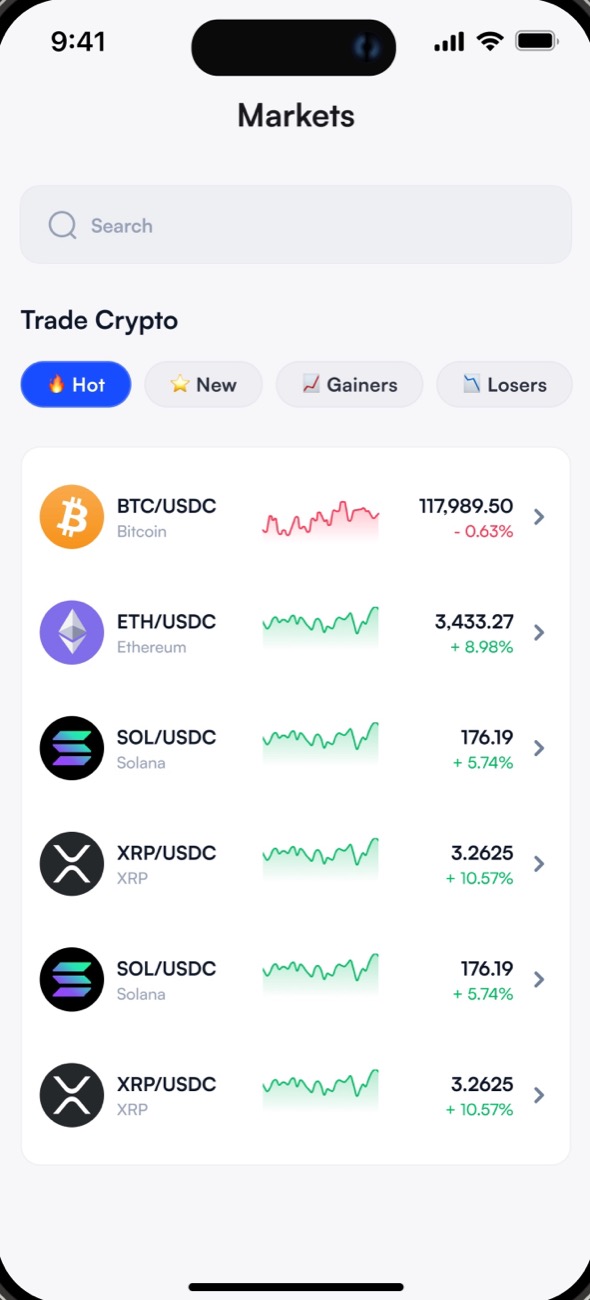
This is the discovery zone, so I kept it light and clean. Filters like Hot, New, Gainers and Losers guide users who aren't sure what to trade, and mini sparklines give a quick read on what's happening without overwhelming them. The layout is compact and scrollable, closer to a product catalogue than a trading terminal: inviting, not intimidating.Trade page:
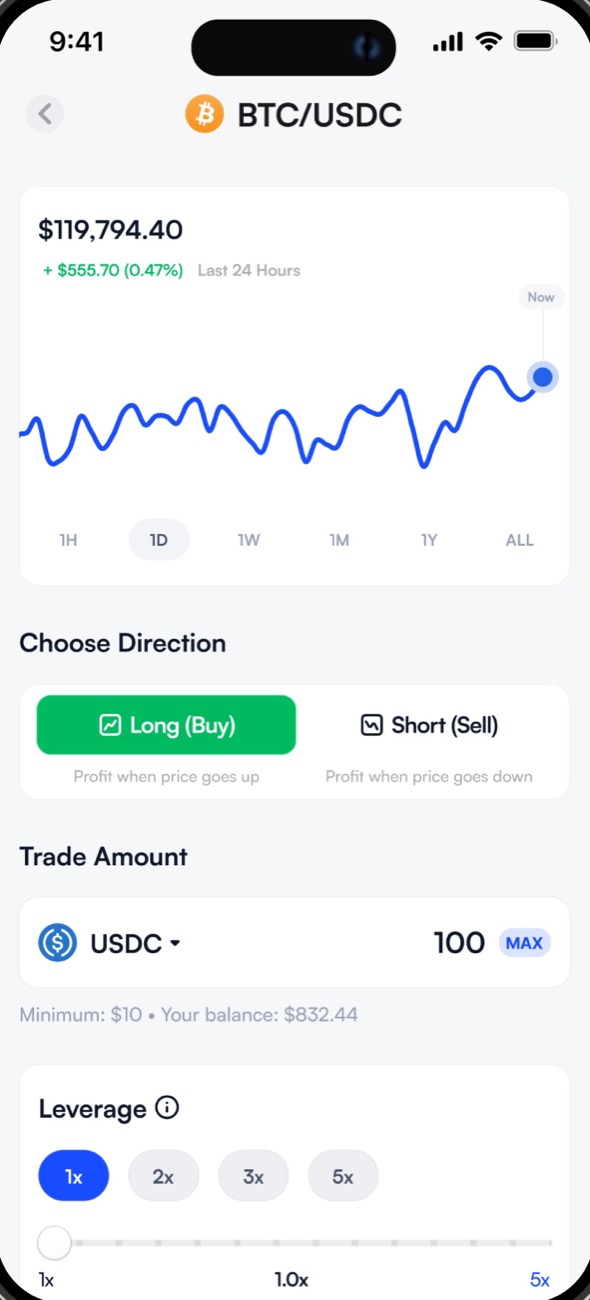
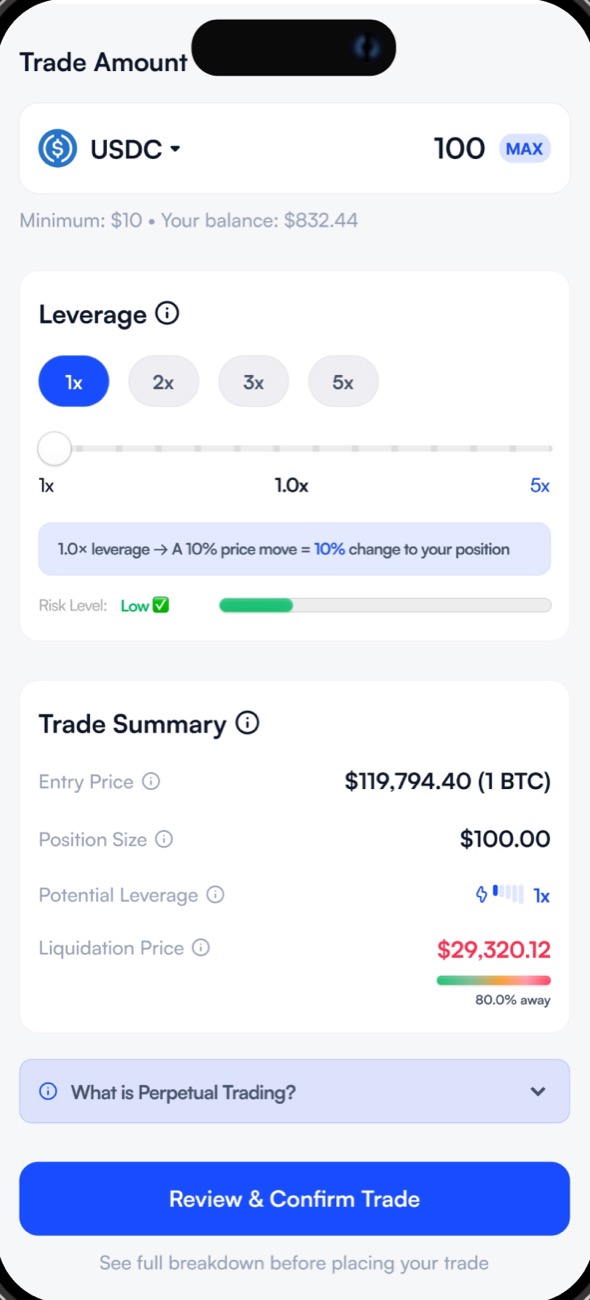
The most important page: it's where every decision starts. The chart gives context, but it sits at the top so it doesn't interrupt the flow, and the inputs follow the natural order of thinking: direction, then amount, then leverage.A visual leverage and risk bar keeps it simple (1x is safer, 5x is higher risk), tooltips explain words like liquidation and leverage, and the liquidation price now shows its distance in percent, so users understand how far they are from being closed out. Everything a beginner needs to make a smart choice, without a Binance tutorial.
Confirm trade:
I wanted this screen to feel calm and reassuring: the decision is made, the user just needs the confidence to press the button. Direction and amount come first, so they know exactly what they're committing to; the risk level is colour-coded (green low, orange moderate, red high); and a "Flexible trading" note takes the pressure off by reminding them they can close at any time.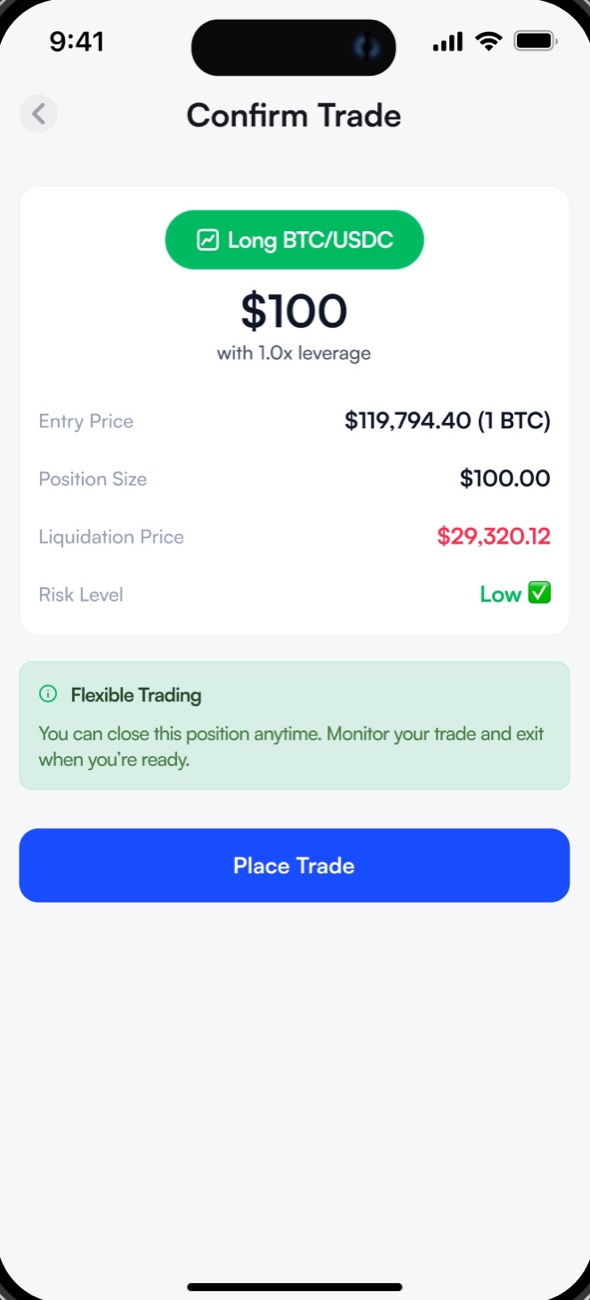
Trade success:
They placed a trade, it worked. One success message, a summary of the trade, and two quick options: view the portfolio to see what they just opened, or place another trade to keep the momentum going.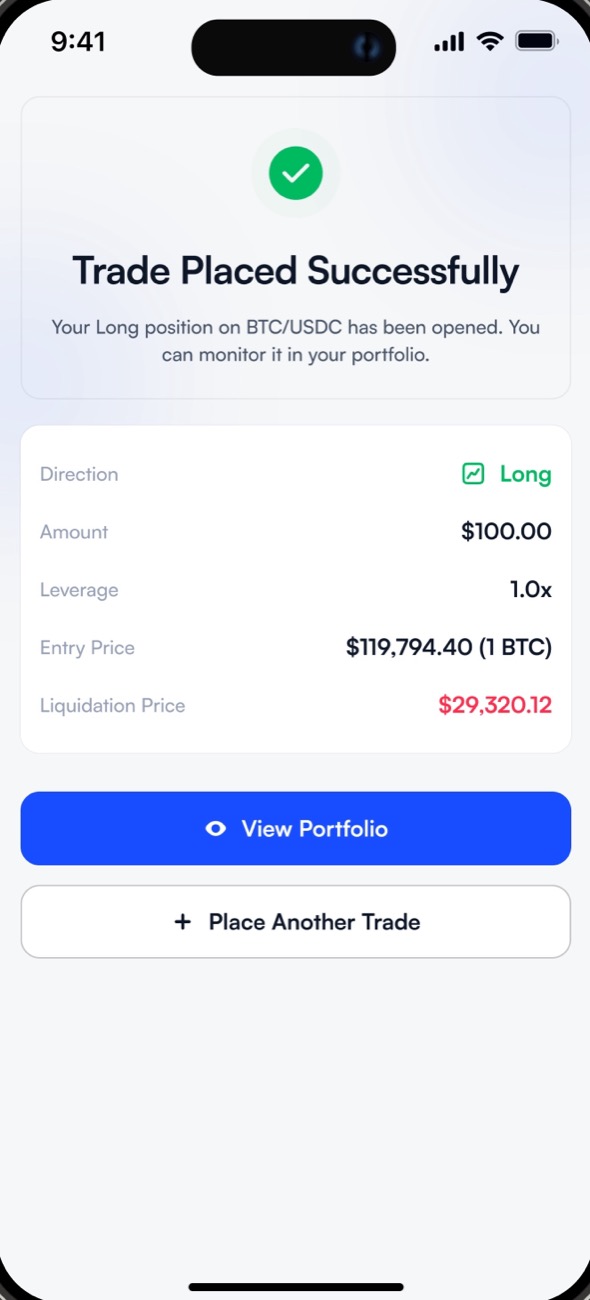
Portfolio:
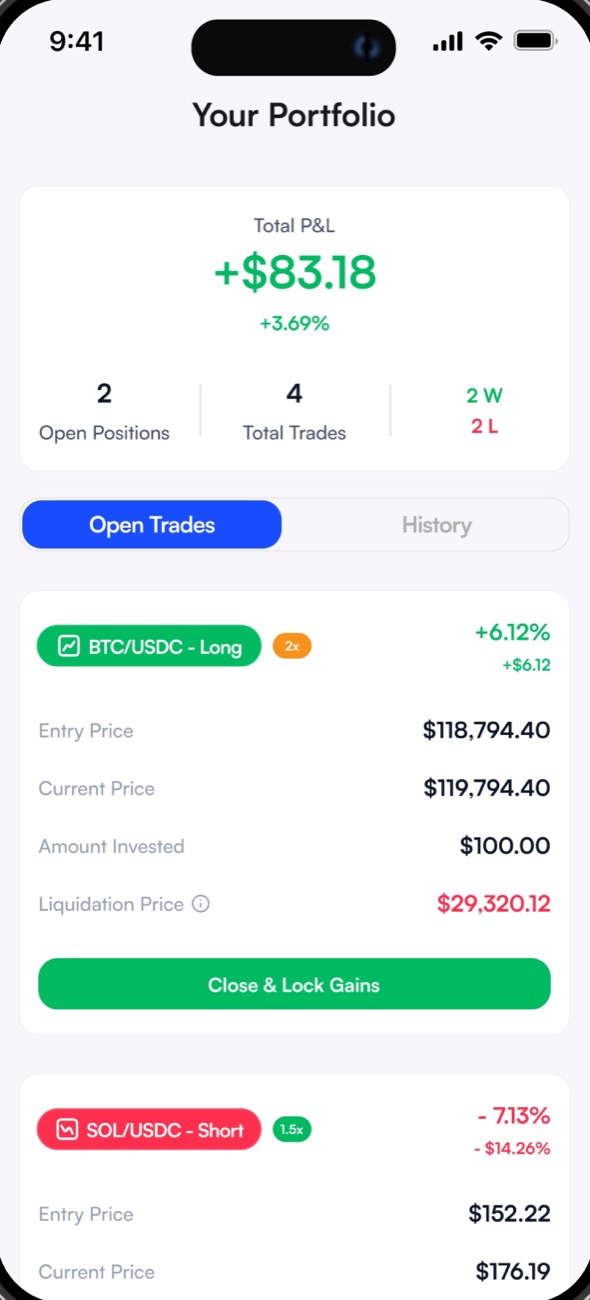
This is where people manage their trades, so everything has to be clear at a glance. Entry, current and liquidation prices sit in that order, past to present to risk. The close buttons match the user's situation: "Close & Lock Gains" on a winning position, "Close & Limit Loss" on a losing one. A light "Ready for your next move?" footer gives guidance without interrupting. The screen should feel in control, not in danger.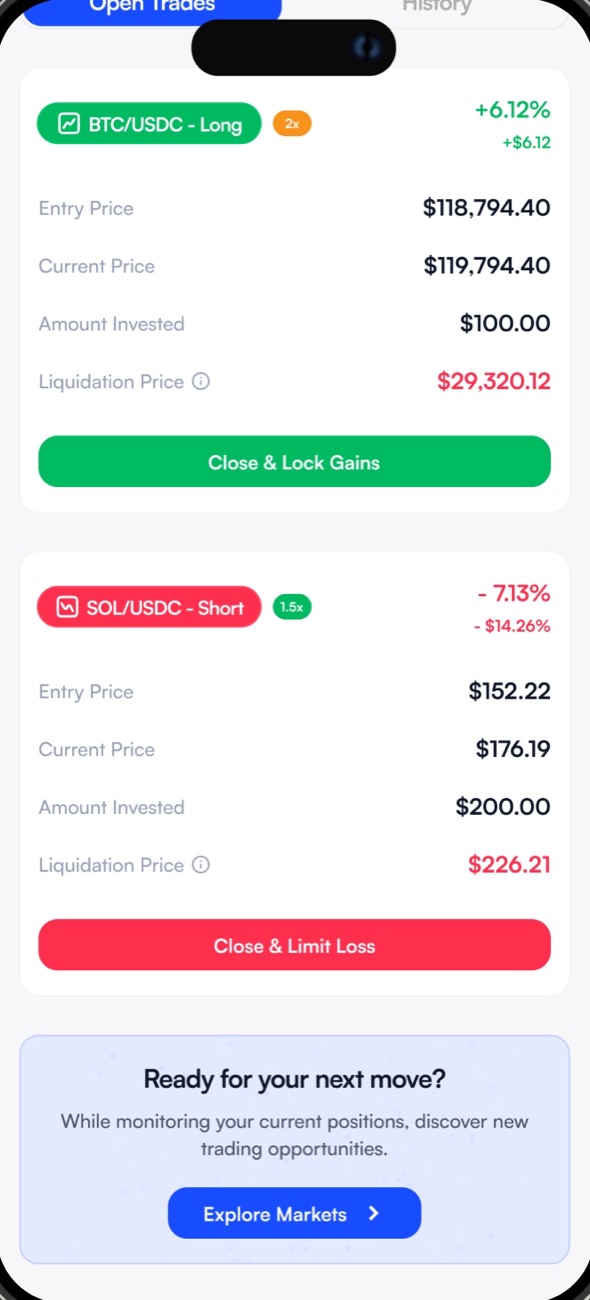
Closing a position:
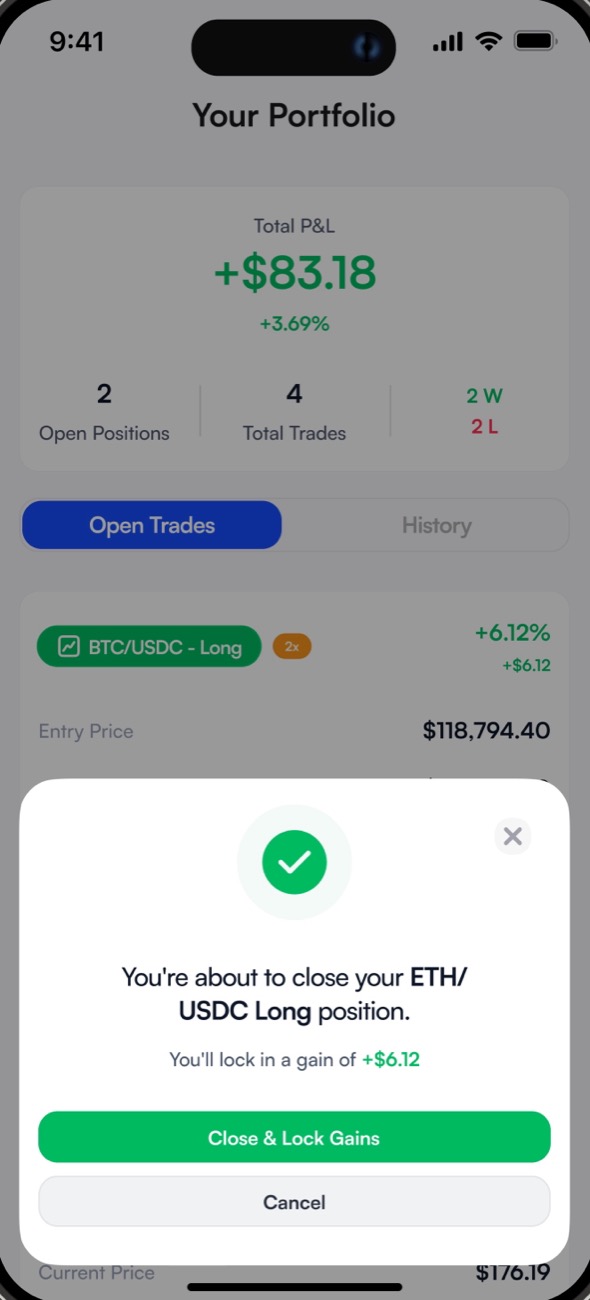
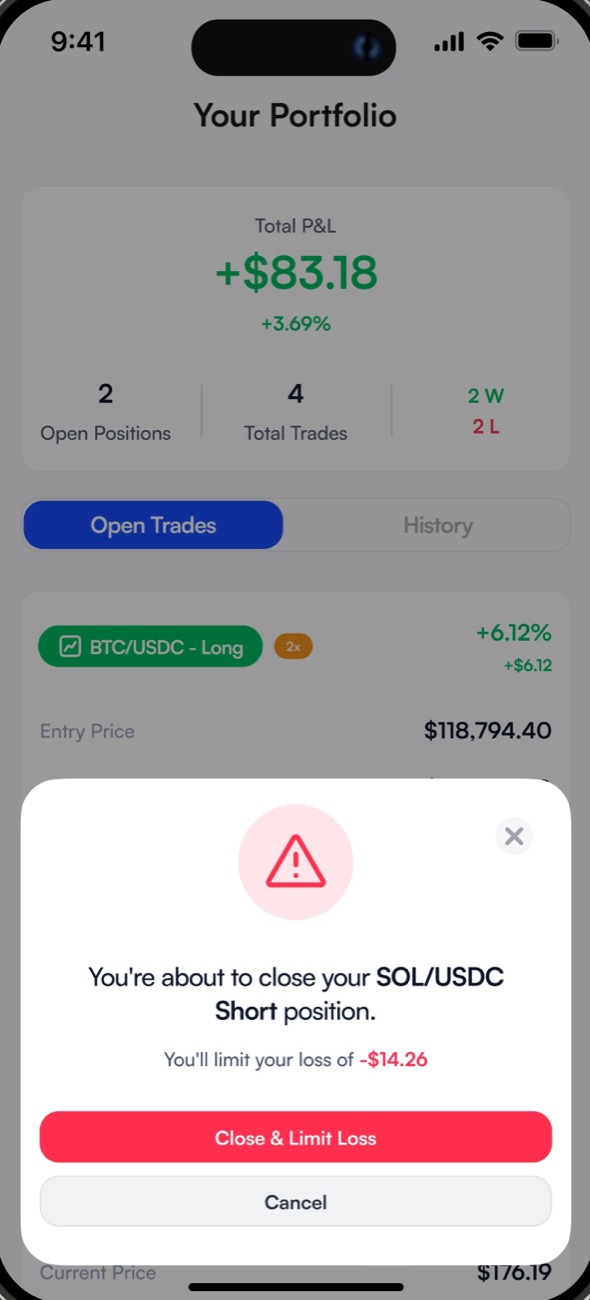
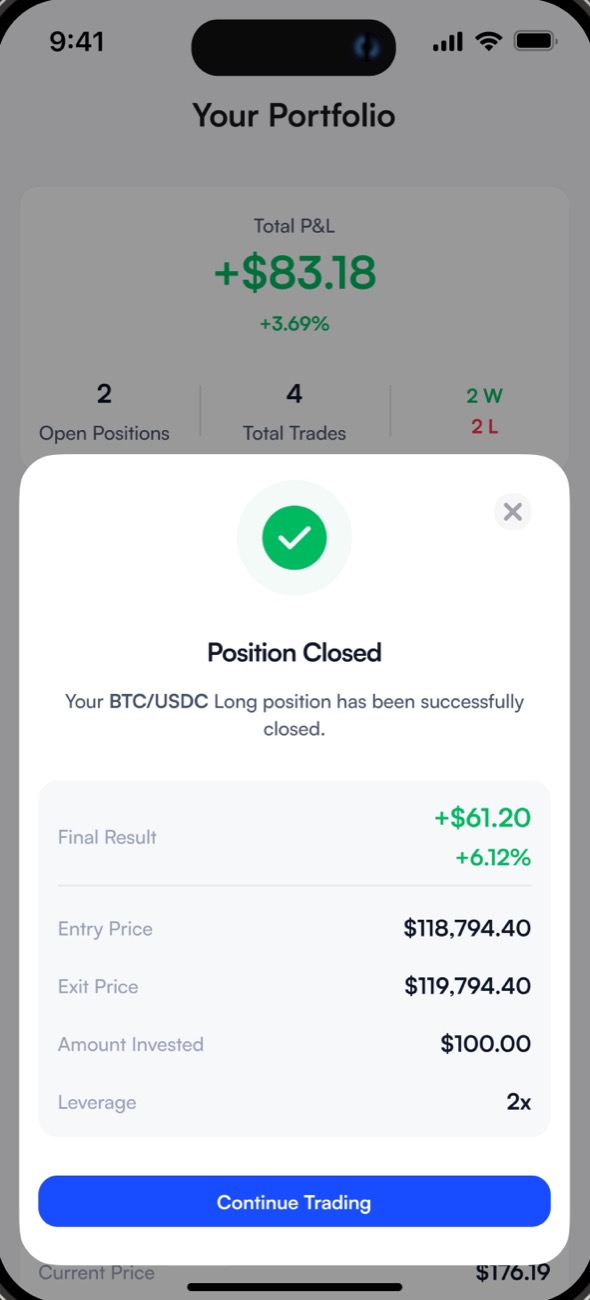
I split closing into two flows, profit and loss, to acknowledge the emotional difference between them. For a gain, a light green tone and copy like "lock in a gain" makes it feel like a win. For a loss, a subtle red and "limit loss" language encourages smart behaviour without making the user feel dumb. It's emotional framing: helping them make peace with the decision, good or bad.Once it's closed, a clear check and "Position Closed" let them breathe. The final result comes first, because that's what they care about; the details are there if they want to dig in, but out of the way.
History:
History is less about numbers and more about reflection. It's minimal but shows wins and losses clearly with subtle colours: you feel it, but it's not punishing. Each trade collapses so the screen isn't overwhelming, and opens when you want to dig in. More a journal of learning than a report card.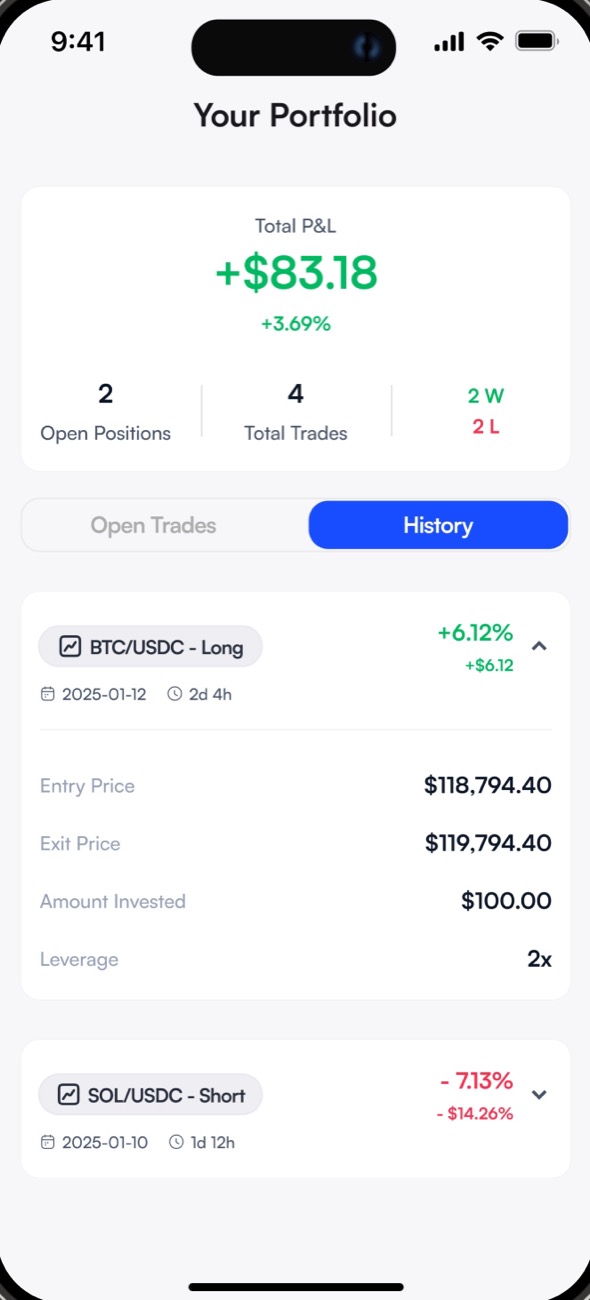
Visual system
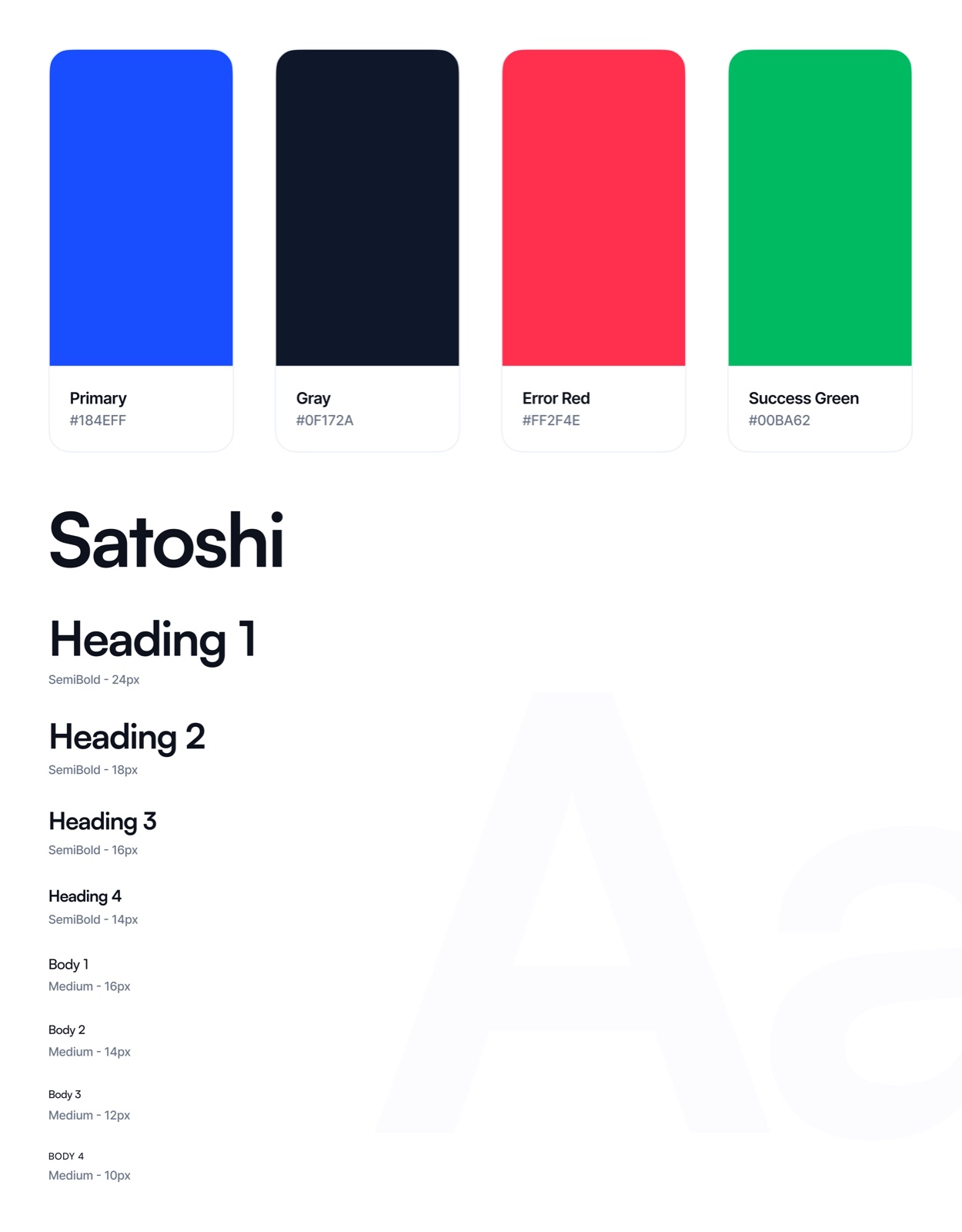
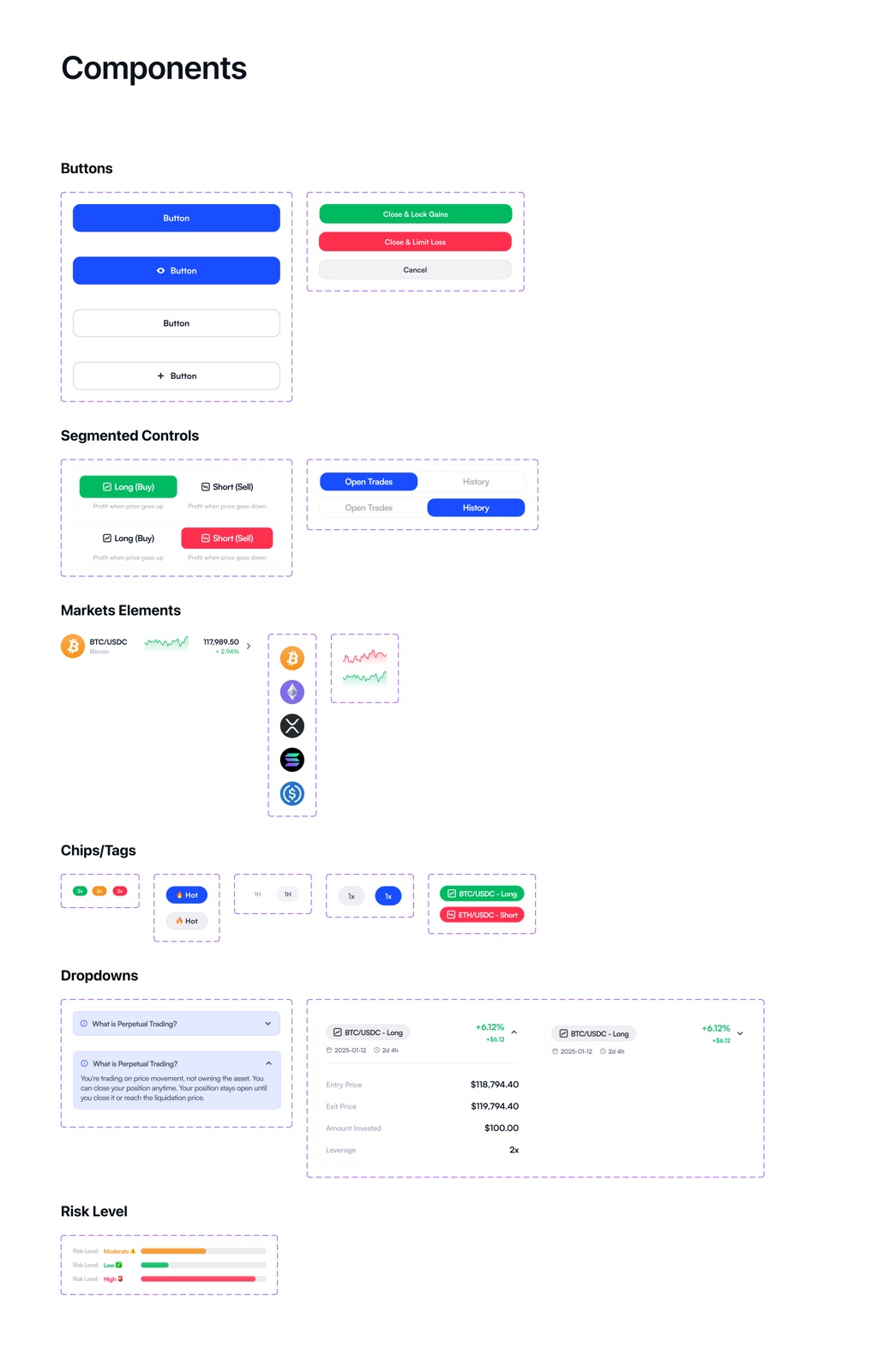
Satoshi for type, from a 24px heading down to 10px body, with four colours: a primary blue, a deep grey, red for errors and losses, green for success and gains. The components carry the same ideas as the screens: risk levels, the open and history toggle, collapsible trade cards and the two close buttons.